AI Agents for Business: What They Do, Examples and Costs
What AI agents do in a business, where they earn their keep by team, when a plain workflow is the better choice, and what they cost to build and to run.
AI agents for business are software that take a goal, such as “resolve this ticket” or “qualify this lead”, decide the steps, and carry them out in your own tools: the helpdesk, the CRM, the accounting system, the shared drive. They are most useful today in support triage, lead qualification and CRM upkeep, document and invoice handling, and answering internal questions from company knowledge. The companies that get value from them start with one narrow job, keep a person on approval for anything touching money or customers, and widen the agent’s access only after it has proved itself.
This guide covers what an agent is and when a simpler workflow does the job better, real examples by team, the ways to get one (built into your tools, built on a platform, or built for you), what it should be allowed to do, what it costs to build and to run, and how to start.
What an AI agent is, and what it is not
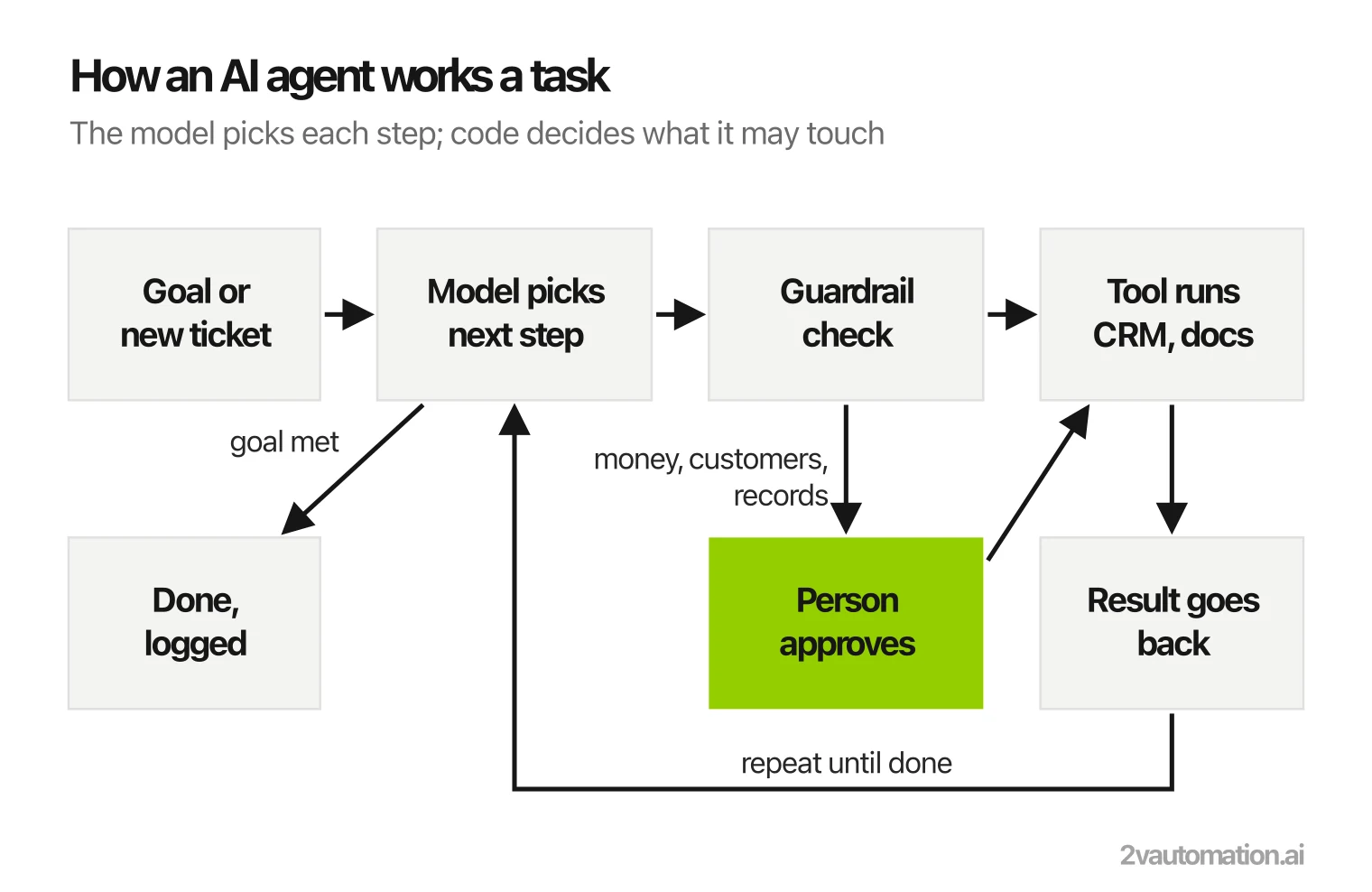
An agent is a language model placed in a loop with tools. You give it a goal. The model reads the situation, picks the next step (look up the customer, read the contract, check the invoice against the purchase order), a tool carries out that step, and the result goes back to the model, which picks the next step. The loop ends when the goal is met or when a rule says a person must take over.
Four parts make it work:
- A model that can call tools. Current GPT, Claude and Gemini models can all decide which tool to use and with what inputs.
- Tools. Each one is a small, fixed piece of code: get a contact, search the knowledge base, create a draft reply, update a deal stage. The model decides when to use a tool; the tool decides how the action is done.
- Memory and context. What has happened in this case so far, and what the agent retrieved from your documents.
- Guardrails. Rules in code that the model cannot talk its way around: which actions need a person’s approval, what it may never touch, when to hand over.
A chatbot is not an agent. A chatbot answers in a chat window and waits. An agent acts in your systems and finishes a task. Many products sold as “AI agents” sit in between: an assistant that drafts while a person does the rest. That is often the right place to start, as long as you know which one you are buying.
You will also see textbook categories (reflex, goal-based, utility-based, learning agents). For a business decision they matter less than one question: how much is the agent allowed to do without a person?
Workflow, AI step or agent: pick the simplest that works
Most of what businesses call AI agents should not be agents. Anthropic, which makes the Claude models, draws the line clearly in its engineering guide Building effective agents: workflows are systems where models and tools run through predefined code paths, while agents direct their own process and tool use. Its advice is to use the simplest solution that works and add autonomy only when the task needs it, because agents trade speed and cost for flexibility.
| Option | What it is | Fits when | Example |
|---|---|---|---|
| Workflow | Fixed steps: when X happens, do Y, then Z | The path is the same every time | New deal signed, create the project, send the invoice |
| Workflow with an AI step | Fixed steps, with a model doing one step: read, classify, extract or draft | The path is fixed but one step needs to understand text | Read an emailed invoice, extract the fields, post it for approval |
| Agent | The model chooses the steps and the tools, case by case | The right next step depends on what the last one found | Work a support ticket: look up the order, check the policy, draft the fix or escalate |
The middle row covers a large share of real business automation, and it is cheaper, faster and easier to test than an agent. Workflow tools such as n8n handle both of the first two rows and can host agent steps too; the guide to what n8n is and what it takes to run shows how, and the n8n vs Make vs Zapier comparison covers which platform fits which team.
If you can draw the process as a flowchart with no “it depends” boxes, build a workflow. Reach for an agent only where the flowchart keeps sprouting exceptions.
How businesses use AI agents: examples by team
The examples below are the jobs where agents earn their keep in B2B companies: frequent, rule-bound, spread across several systems, and tedious for the people doing them today.
Customer support
An agent reads each incoming ticket, works out what the customer wants and how urgent it is, pulls the order, account or contract, checks the relevant policy, and either drafts a reply for a person to send or resolves the simple cases itself. Hard cases reach a person with the context already gathered. This is the most common starting point, because the volume is high and the answers live in documents the company already has. Our page on AI agents for customer service covers what that build looks like.
Sales and CRM
Agents research inbound leads, enrich the record, score them against your ideal customer, route them to the right rep or to nurture, and keep the CRM current after calls by turning notes into next steps and field updates. Outbound research and first-draft personalization are common too, with a rep approving what is sent. See sales and CRM automation for the agent work that sits inside a sales process.
Finance and accounts payable
An agent can read invoices and receipts in any layout, match them to purchase orders and contracts, flag mismatches, chase missing documents, and prepare entries for approval. Payments themselves stay behind a person. The finance automation page covers invoice processing end to end.
Operations and documents
Operations teams use agents to pull reports from several systems and flag what changed, watch queues and deadlines and alert the owner before something slips, and process documents that arrive by email: intake forms, applications, certificates, contracts. Much of this is the “workflow with an AI step” row above, with an agent only where cases vary. More in operations automation.
HR and recruiting
Agents screen applications against the role’s requirements, match candidates to open roles, schedule interviews, and answer employees’ policy questions from the handbook. Hiring decisions stay with people. See recruiting and HR automation.
Internal knowledge assistants
A knowledge assistant answers questions from your own documents using retrieval-augmented generation (RAG): for each question it first finds the relevant passages in your content, then writes an answer from them, so it can cite its source instead of answering from memory. It is often the first AI project a company runs, because it reads and never writes. Strictly it sits on the answering side of the line drawn above, but it is the knowledge layer most agents later rely on. 2V Automation built one for Georgia State University: a RAG assistant that answers visitor questions at Georgia Aquarium from the aquarium’s own content, taken from kickoff to a pilot with real visitors in three months. It retrieves and answers; it does not act in other systems.
Where AI agents for business come from: buy, build or hire
There are four ways to get a business AI agent. They differ less in the model underneath than in who owns the setup, how deep it reaches into your systems, and who fixes it when it breaks.
| Option | Examples | Fits when | Watch out for |
|---|---|---|---|
| Agents built into tools you own | Microsoft Copilot Studio, Salesforce Agentforce, HubSpot Breeze, the AI agents in Zendesk or Intercom | The whole job lives inside that one product | They stop at the product’s edge; per-seat or per-resolution pricing grows with volume |
| No-code agent builders | Zapier Agents, Lindy, Relevance AI | A small team wants to test an idea this week | The agent and its logs live in the vendor’s account; limited control over guardrails and testing |
| Workflow platform with agent steps | n8n, Make | The job is mostly a workflow with a few judgment steps | Someone has to build and maintain it to production standard |
| Custom agent on model APIs | OpenAI, Anthropic Claude, Google Vertex AI, Amazon Bedrock, with frameworks such as LangGraph or CrewAI | The job spans several systems, carries real stakes, or has confidentiality rules | Needs engineering, a test set and monitoring; the build is the main cost |
Whichever you choose, ask where the agent runs, whose API keys and accounts it uses, where its logs are kept, and what you keep if you stop paying. An agent that runs in your own accounts can be handed to another team or vendor; one that lives inside a builder’s platform usually cannot.
Connections are getting easier to build. The Model Context Protocol (MCP) is an open-source standard for connecting AI applications to data sources and tools, so one connector to your system can serve several models and products. It saves wiring; it does not decide what the agent should be allowed to do.
When the job crosses several systems and you would rather have it built than build it, a custom AI agent development team does the design, connections, guardrails and testing. The guide to the best AI automation agencies compares who does this work and how they price it.
What an agent should be allowed to do
The real risk with a business agent is rarely one bad answer. It is too much access. A wrong draft costs a minute of a person’s time; a wrong refund, a wrong email to a client or a wrong change to a record of truth costs a lot more. Decide the agent’s action surface before it is built, one action at a time:
| Level | The agent may | Typical actions |
|---|---|---|
| Read | Look things up and answer | Search documents, read the CRM, check an order status |
| Draft | Prepare work for a person to send or save | Reply drafts, proposed CRM updates, prepared invoice entries |
| Write with approval | Act after a person clicks approve | Refunds and credits, emails to customers, changes to contracts, payments |
| Act alone | Act, with every action logged and sampled | Tagging and routing tickets, internal notes, internal alerts, low-stakes field updates |
Start at read or draft. Money, customer-facing messages and compliance-relevant records stay behind approval as a rule written in code, because a prompt can be argued with and code cannot. Give the agent its own account with only the permissions its job needs, so its actions are visible in each system’s audit trail.
What AI agents cost to build and to run
An agent has two costs: building it (connections, rules, tests) and running it (model calls, hosting, someone watching the logs). For agents built into a SaaS product, both are folded into a seat or per-resolution price. For custom agents, the build is the larger number and the model calls are usually smaller than people expect.
Worked example (illustrative volumes). A support agent handles 3,000 tickets a month. Each ticket takes several model turns; together they read about 8,000 tokens (the ticket, retrieved policy passages, instructions, tool results) and write about 800. At the list price of Claude Sonnet 5.5 on Anthropic’s pricing page (checked November 2026: $2 per million input tokens, $10 per million output tokens):
- Input: 3,000 × 8,000 = 24 million tokens × $2 = $48 a month
- Output: 3,000 × 800 = 2.4 million tokens × $10 = $24 a month
- Model calls in total: about $72 a month
If each ticket pulls four times as much context (32,000 tokens), input alone rises to $192 a month. Long conversations, large retrieved documents and agents that loop are what move the bill, which is why the token count per case is worth watching from day one. Hosting the workflow or service around the agent adds its own, usually modest, cost.
The build is where the money goes. 2V Automation prices each build per project before it starts, $6,000 to $24,000 for one process, with the range set by how many systems the process touches and how much has to be built rather than configured; the pricing page has the details. To check whether an agent pays for itself before you commit, the automation ROI guide walks through the calculation.
What goes wrong with AI agents in production
Demos rarely fail. Agents in daily use fail in a handful of predictable ways:
- Confident wrong answers. Without retrieval from your own content, a model fills gaps from memory. Ground answers in your documents and make the agent say when it cannot find one.
- Loops and runaway cost. An agent that keeps calling the same tool burns tokens and time. Cap the number of steps per case and alert on cost per case.
- Instructions hidden in inputs. An email or document can contain text written to steer the agent. Treat everything the agent reads as data, and keep risky actions behind approval so a hijacked step cannot complete one.
- Drift. A model update, a changed prompt or a renamed CRM field can quietly change behavior. Keep a test set of 30 or more real past cases and run it after every change.
- Silent failure. If nobody reads the logs, you hear about a problem from a customer. Log every action with its input, output and reason, sample a few each week, and send failures to an owner.
None of this is exotic engineering. It is the same discipline as any production system: tests, logs, alerts and an owner. It is also the part most pilots skip, which is why many never leave the pilot stage.
How to start with AI agents in your business
- Pick one narrow, frequent job. “Triage billing tickets” works; “be our assistant” does not. The job should happen often, follow rules a person can write down, and have a clear finished state.
- Write down the rules and the data. Which systems it touches, which documents it needs, and how your best person decides each kind of case.
- Set the action surface. For each action, decide read, draft, approve or act alone, using the table above. Start read-only.
- Build a test set from past cases. Thirty or more real cases with known right answers, run after every change.
- Run it in shadow mode. The agent proposes what it would do on live work while people still do the work. Compare the two.
- Give it a small share of live work. Route a slice of cases to the agent, keep approvals on anything risky, and read the logs.
- Widen access only when it has earned it. Move one action at a time from approval to autonomous, based on what the logs show.
If you are not sure which job should go first, that is a process question before it is an AI question. A discovery week maps how the work actually runs today and prices each candidate, agent or plain workflow, by what pays back first.
Every guide on AI agents for business
Frequently asked questions
What are the top 5 AI agents for business?
There is no single top 5, because an agent is only as good as the job and the systems it is connected to. The names that come up most are the agents built into tools companies already pay for (Microsoft Copilot Studio, Salesforce Agentforce, HubSpot Breeze, the AI agents in Zendesk and Intercom), no-code builders such as Zapier Agents, Lindy and Relevance AI, and the model platforms custom agents are built on (OpenAI, Anthropic's Claude, Google Vertex AI, Amazon Bedrock). Pick the category first, then the product.
Are there free AI agents for business?
Several builders have free tiers, and open-source frameworks such as CrewAI and LangGraph cost nothing to download. The model calls behind them are never free: every step the agent takes is billed by the model provider, on your key or inside the vendor's price. Free tiers are fine for a test on a small batch. A process the business depends on needs a paid plan.
Can I use agentic AI on Google Cloud?
Yes. Google Cloud offers agent building through Vertex AI, and the Gemini models can call tools the same way other frontier models do. It is a natural choice when your data and identity already live in Google Cloud or Google Workspace; the same agent design works on Microsoft Azure, AWS Bedrock or the OpenAI and Anthropic APIs.
Is there a better AI than ChatGPT for business agents?
For an agent, the question is which model does this job reliably at an acceptable cost. GPT, Claude and Gemini models all support tool calling, and the right pick changes with the task, the volume and confidentiality rules. Build the agent so the model can be swapped, and test the candidates on your own past cases instead of a public leaderboard.
Will AI agents replace employees?
In practice they take over the repetitive part of a role: reading, sorting, looking things up, filling in records, drafting the first reply. The judgment calls, the exceptions and the approvals stay with people, and someone has to own the agent itself. Most companies use agents to absorb growth without hiring for the repetitive work, rather than to cut a team.
How long does it take to deploy an AI agent?
An agent built into a tool you already use can be switched on in days, then needs a few weeks of supervised use. A custom agent connected to several systems usually takes a few weeks to build and test, plus a shadow period before it acts on live work. The time goes into the connections, the test cases and the approval rules. The model itself is the quick part.